Rudder 9.2 takes the Policy and Benchmark Compliance solution to a brand-new level. Gone are the days of rigid rule-making: you can now enjoy tailored controls designed around your day-to-day operational needs, without taking up your server resources.
Discover how this latest version gives you a global view of your infrastructure’s security and adapts automation to your reality.
Built specifically for hybrid infrastructures, Rudder platform automates your IT compliance, system hardening and patching. Designed for Ops and Security teams, it helps you meet standards such as NIS2, ISO 27001 and CIS Benchmarks – without compromising on machine performance.
1. Security benchmarks: adapt rules to your production environment
Introduced in version 9.0, Security Benchmarks marked a breakthrough in continuous system assessment. Building on real-world feedback, 9.2 turns these generic standards into tailored security tools.
Benchmark deviation: customise your controls in YAML
Applying a generic benchmark without adapting it can be like trying to fit a square peg in a round hole. With the latest release, you can save an entire CIS benchmark and manage it with ease in a simple YAML file.
And you’ll see the benefit straight away: duplicate, modify and adapt your benchmarks effortlessly.
- Override implementations: Redefine a control in line with your specific technical requirements.
- Enrich documentation and add context: Add your own documentation and apply custom tags to clarify the criticality of a control.
- Fine-grained control over execution: Disable specific controls or restrict them to Audit or Enforce mode directly from the file.
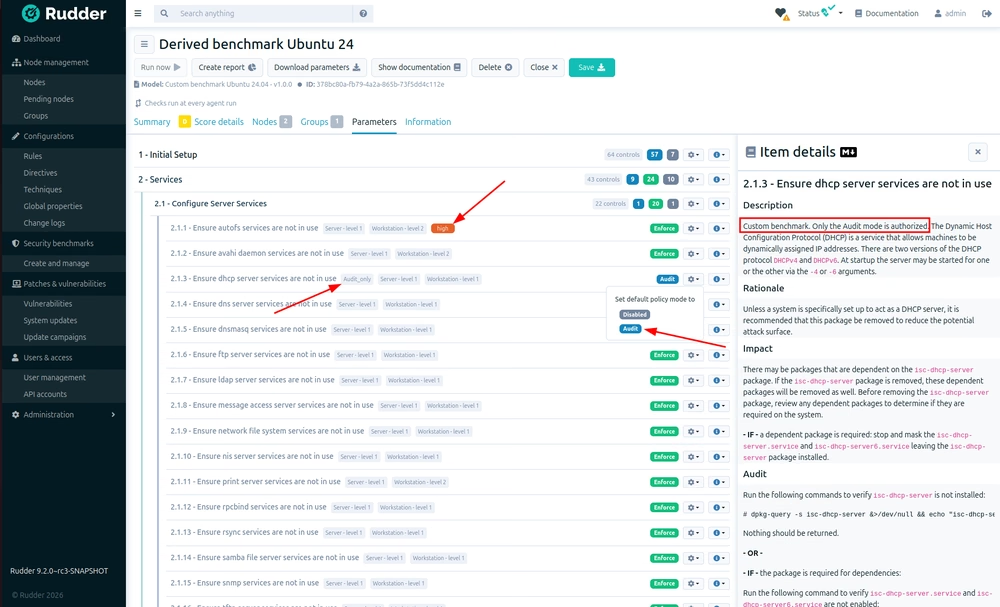
This means you can manage benchmarks that align with your own policies.
Flexible scheduling: save RAM and keep your servers running smoothly
Running a full benchmark every five minutes makes little sense to your operations. Not to mention the unnecessary strain it puts on your machines’ memory. Rudder 9.2 introduces a dedicated Schedule tab for fine-grained control over benchmark execution (available on Linux).
- Configurable frequency: Choose a schedule suited to each situation: daily, weekly, monthly or every few months.
- Load levelling: Spread analyses across a time window to avoid overwhelming RAM and CPU resources.
- On-demand execution: Run a benchmark manually using the new dedicated button.
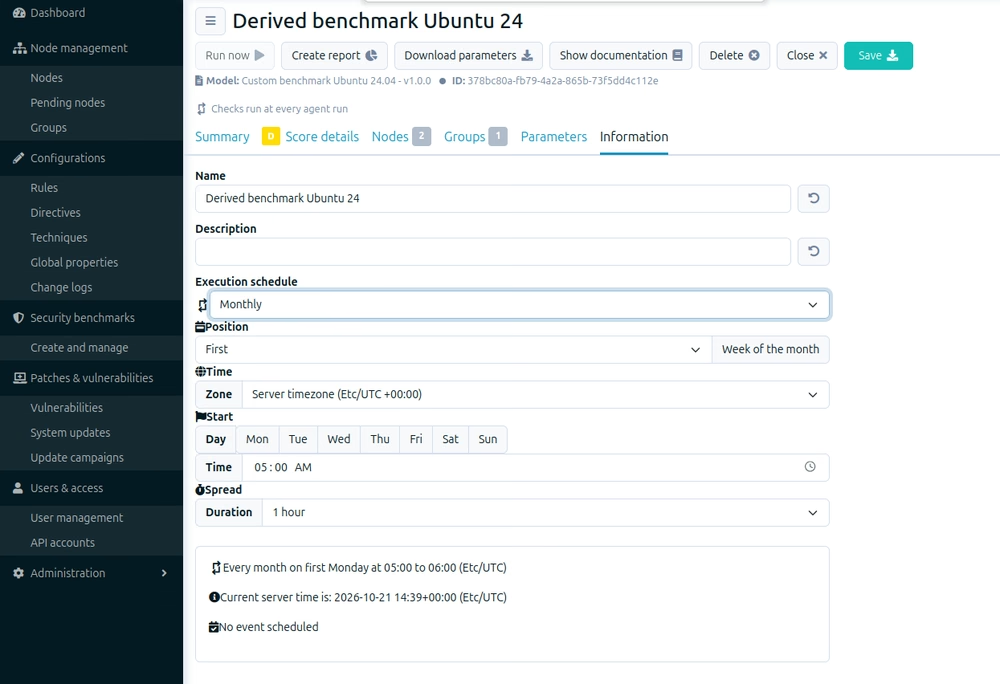
Enjoy efficient continuous monitoring without overloading your production servers.
2. Multi-tenancy read & write: delegate operational responsibilities with confidence
With multi-tenancy, you could only grant read-only access within restricted contexts. Until now. With Rudder 9.2, we are evolving the underlying architecture to introduce Read & Write access.
Now you can assign responsibility for a specific group of nodes to a specific team or dedicated user. They then have the freedom they need to apply hardening measures within their own scope, without risking disruption to another department’s machines.
You give local teams genuine operational autonomy, while keeping governance at the core. Ideal for large organisations, subsidiaries and Managed Security Service Providers (MSSPs).
3. Interoperability: CSV exports wherever you need them
Security information is no good if it’s hidden away somewhere. Rudder 9.2 builds on the advances in 9.1 by extending CSV data export capabilities to practically the entire interface.
You’ll now find a direct export button in:
- the ‘Compliance’ tab under ‘Rules’
- the ‘Score Details’ tab in ‘Security Benchmarks’
- the Compliance views for nodes.
Share your compliance reports with third-party teams, feed your SIEMs and save hours of audit preparation time.
4. Advanced security and traceability: stay in control of every action
Change Logs: search faster, restore without collateral damage
The Change Logs feature records every action to ensure seamless compliance with traceability requirements (e.g. NIS2 and ISO 27001).
With Rudder 9.2, the experience is even more refined:
- User-friendly search and filters: Isolate relevant events in seconds using the improved search bar.
- Targeted ‘Restore’ button: Instead of frantically undoing all the changes you made recently, you can now restore the exact state of a specific object (Technique, Directive, Rule, Group).
Here’s an example: Bob modified a Rudder technique two months ago, but today he realised that it wasn’t a good idea. He can now restore the original configuration in a single click, without erasing the three weeks of work that the rest of the team has done since.
Two-factor authentication using TOTP
Rudder Core natively supports two-factor authentication using a Time-based One-Time Password (TOTP) to access the system securely. Each user can link their mobile Authenticator app using a simple QR code.
This feature naturally complements the authentication options already available (SSO and LDAP), providing a level of protection that meets the latest requirements.
Take control back of your compliance
With its focus on customisable benchmarks, conserving server resources and segmenting access, Rudder takes a major leap forward with the 9.2 release – offering tailored control that’s adapted to real-world conditions. No more having to choose between strict security and operational efficiency.


Robinson Maigné
Passionate about cybersecurity, Robinson Maigné helps organizations turn their constraints into strategic advantages.
A generalist engineer by training, he now works as a Solutions Engineer at Rudder. His approach? Listening closely to operational needs to design tailored compliance automation strategies.